Recommended Searches:
Partiful
AFK Journey
Max
Clash of Clans
Mila
UpStudy
MacroFactor
Timeleft
Baby Daybook
Infinite Painter
Peacock TV
Squad Busters
Eggy Party
Honkai
Kingdom Rush 5
Cookie Run


Latest Version
Version
7.7-74845f8
7.7-74845f8
Update
March 02, 2026
March 02, 2026
Developer
AT&T Services, Inc.
AT&T Services, Inc.
Categories
Tools
Tools
Platforms
Android
Android
Downloads
0
0
License
Free
Free
Package Name
com.att.mobilesecurity
com.att.mobilesecurity
Report
Report a Problem
Report a Problem
More About AT&T ActiveArmor®lication
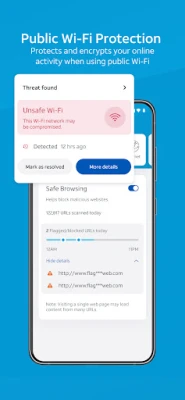
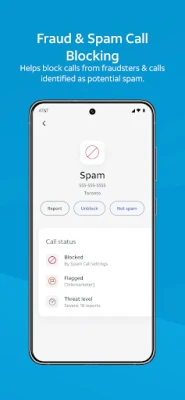
AT&T ActiveArmor mobile security helps keep your phone and personal data safe from cyber threats. Whether it is a spam call, a suspicious text, a malicious link, or an attempt to access or steal your personal data when you are using public Wi-Fi®, AT&T ActiveArmor is 24/7 security you can count on.
AT&T ActiveArmor mobile security (FREE) service includes: *
• Auto Fraud & Spam Call Blocking
• Call Routing Settings
• My Block List
• My Contacts
• Device Scan
• Device Security Alerts
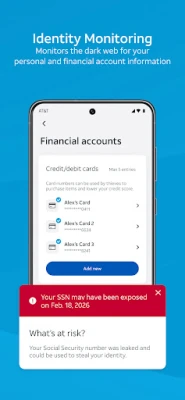
• Data Breach Alerts
The following free AT&T ActiveArmor mobile security features are only available to AT&T wireless customers: Call Routing Settings, My Block List, Auto Fraud Risk Call Blocking, Spam Call Blocking, My Contacts, and Caller ID.
AT&T ActiveArmor Advanced mobile security service (In-app $7/mo. purchase) includes all features of the FREE AT&T ActiveArmor mobile security service, plus these additional benefits:**
• Caller ID
• Reverse Number Lookup
• Device Theft Alerts
• Privacy Advisor
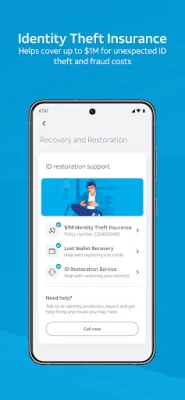
• $1M Identity Theft Insurance
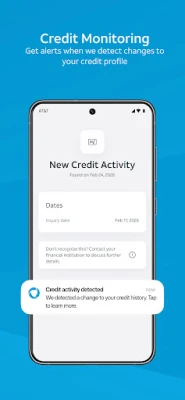
• Financial Monitoring
• Payday Loan Monitoring
• Public Wi-Fi Protection (VPN & Wi-Fi Alerts)
• Safe Browsing
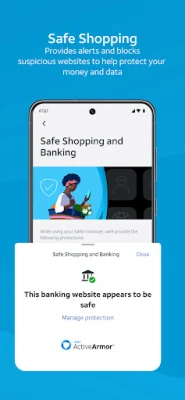
• Safe Shopping/Banking
• Identity Monitoring
• Social media ID Protection
• Lost Wallet Recovery
• ID Restoration
• Password Manager
This app uses Accessibility services and respective permissions after active consent is given from the end user. This optional functionality is only used for the Safe Shopping & Banking feature.
*Requires compatible device/service and download of ActiveArmor app. Other terms and restr’s apply. May not detect all threats and may inadvertently block wanted calls. Visit att.com/activearmorapp for details. Data charges may apply. Some features may not work while roaming internationally.
**Advanced Mobile Security
Subscribers pay $7/mo. Auto-billed every month through your Google Play account unless canceled.
Your subscription automatically renews and your account will be charged $7 unless auto-renew is turned off at least 1 day (24 hours) before the end of the current billing (subscription) period or next payment.
To manage your AT&T Active Armor Mobile Security (“Active”) subscription, go to Google Account and Manage Subscriptions and Payments.
Once your Advanced subscription is canceled, you will be downgraded and continue to have access to the free ActiveArmor mobile security service/app.
• To remove the service entirely after your Google subscription ends, you must cancel in Settings menu of the ActiveArmor App or via myATT using the Add-on menu.
• Payments are non-refundable, except as required by law.
• For details, visit https://www.att.com/support/article/wireless/KM1252909/
Visit www.att.com/activearmor for details.
Visit https://www.att.com/legal/terms.activeArmorMobileSecurity.html for the full AT&T ActiveArmor mobile security Terms of Service.
AT&T ActiveArmor mobile security (FREE) service includes: *
• Auto Fraud & Spam Call Blocking
• Call Routing Settings
• My Block List
• My Contacts
• Device Scan
• Device Security Alerts
• Data Breach Alerts
The following free AT&T ActiveArmor mobile security features are only available to AT&T wireless customers: Call Routing Settings, My Block List, Auto Fraud Risk Call Blocking, Spam Call Blocking, My Contacts, and Caller ID.
AT&T ActiveArmor Advanced mobile security service (In-app $7/mo. purchase) includes all features of the FREE AT&T ActiveArmor mobile security service, plus these additional benefits:**
• Caller ID
• Reverse Number Lookup
• Device Theft Alerts
• Privacy Advisor
• $1M Identity Theft Insurance
• Financial Monitoring
• Payday Loan Monitoring
• Public Wi-Fi Protection (VPN & Wi-Fi Alerts)
• Safe Browsing
• Safe Shopping/Banking
• Identity Monitoring
• Social media ID Protection
• Lost Wallet Recovery
• ID Restoration
• Password Manager
This app uses Accessibility services and respective permissions after active consent is given from the end user. This optional functionality is only used for the Safe Shopping & Banking feature.
*Requires compatible device/service and download of ActiveArmor app. Other terms and restr’s apply. May not detect all threats and may inadvertently block wanted calls. Visit att.com/activearmorapp for details. Data charges may apply. Some features may not work while roaming internationally.
**Advanced Mobile Security
Subscribers pay $7/mo. Auto-billed every month through your Google Play account unless canceled.
Your subscription automatically renews and your account will be charged $7 unless auto-renew is turned off at least 1 day (24 hours) before the end of the current billing (subscription) period or next payment.
To manage your AT&T Active Armor Mobile Security (“Active”) subscription, go to Google Account and Manage Subscriptions and Payments.
Once your Advanced subscription is canceled, you will be downgraded and continue to have access to the free ActiveArmor mobile security service/app.
• To remove the service entirely after your Google subscription ends, you must cancel in Settings menu of the ActiveArmor App or via myATT using the Add-on menu.
• Payments are non-refundable, except as required by law.
• For details, visit https://www.att.com/support/article/wireless/KM1252909/
Visit www.att.com/activearmor for details.
Visit https://www.att.com/legal/terms.activeArmorMobileSecurity.html for the full AT&T ActiveArmor mobile security Terms of Service.
Rate the App
Add Comment & Review
User Reviews
Based on
No reviews added yet.
Comments will not be approved to be posted if they are SPAM, abusive, off-topic, use profanity, contain a personal attack, or promote hate of any kind.














More »

Popular Apps

Telegram 5Telegram FZ-LLC

Water Connect FlowIEC Global Pty Ltd

Car Mechanic Job: SimulatorCar Simulator Crafting & Building FPS Arcade Games

MyBambuBetter Than Banking

School PlannerAndrea Dal Cin

My Singing MonstersBig Blue Bubble

Warlords of AternumInnoGames GmbH

Standoff 2Axlebolt

King of ThievesZeptoLab

InstagramInstagram
More »
Editor's Choice

Hopeless Land: Fight for SurvivalHK HERO ENTERTAINMENT CO.,LIMITED

Last Shelter: SurvivalLong Tech Network Limited

Toy Defense Fantasy — Tower Defense GameMelsoft Games
Warlords of AternumInnoGames GmbH

Vikings: War of ClansPlarium LLC
King of ThievesZeptoLab

MachinariumAmanita Design

Egg WarsBlockman Go Studio

Murder in the AlpsNordcurrent

Battlelands RoyaleFutureplay